Why Microphone Selection Can Make or Break Your Conference
No matter how impressive your stage design or visuals may be, a conference fails the moment the audience can’t hear clearly. That’s why choosing the right microphones is one of the most important decisions in any professional event.
Microphones are the single most critical element of conference AV. Poor mic choice leads to:
- Inconsistent volume
- Feedback and echo
- Distracting dropouts
- Nervous speakers
- Frustrated attendees
This guide breaks down which microphones work best for conferences, how professionals choose them, and how to avoid common mistakes—based on real-world conference production experience across Clearwater, Tampa, and Central Florida.
Whether you’re planning a corporate summit, leadership meeting, or multi-day conference, this article will help you make informed, stress-free audio decisions.
Why Audio Clarity Is the #1 Priority at Conferences
Visuals enhance engagement—but audio delivers the message.
At conferences:
- Attendees must understand complex ideas
- Speakers often move, gesture, and interact
- Sessions run back-to-back with different presenters
- Hybrid audiences rely entirely on clean audio feeds
Even minor audio issues are amplified in professional environments. That’s why experienced AV teams design microphone systems room by room, speaker by speaker.
Main Types of Conference Microphones
No single microphone works for every situation. Professional conference AV setups combine multiple mic types to match the agenda and speaking style.
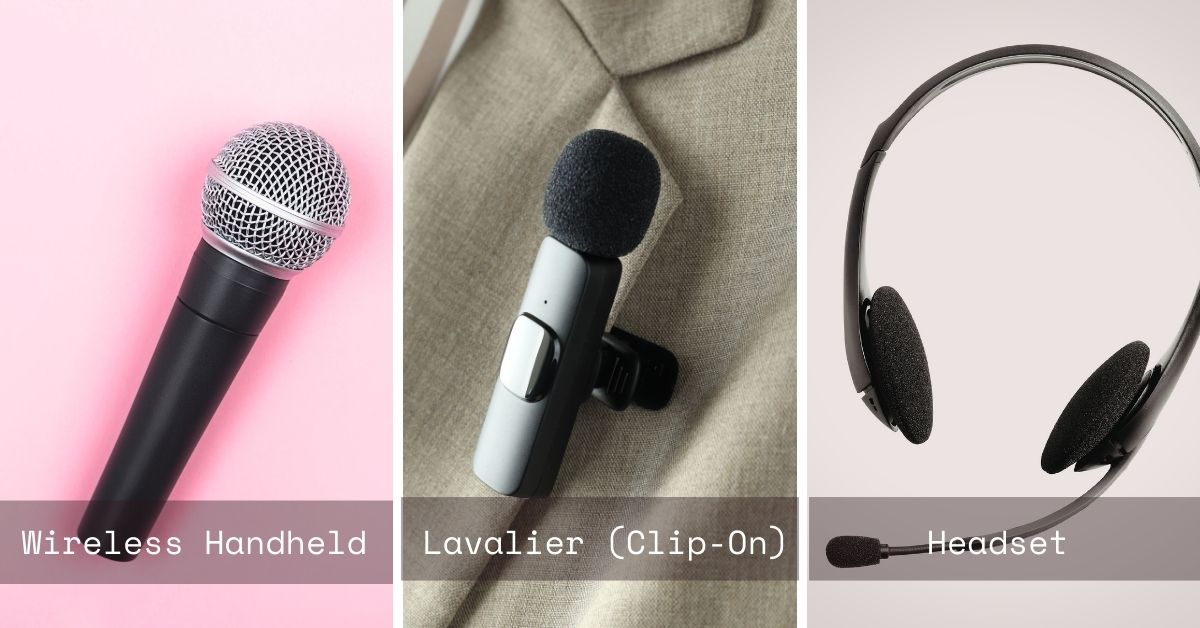
1. Wireless Handheld Microphones
Best for:
- Audience Q&A
- Panel discussions
- Guest speakers
- Moderated sessions
Why they work:
Handheld mics are reliable, intuitive, and excellent at rejecting background noise.
Professional considerations:
- Ideal for shared use
- Requires good mic technique
- Often paired with audience runners during Q&A
2. Lavalier (Clip-On) Microphones
Best for:
- Keynote speakers
- Corporate presenters
- Executive talks
Why they work:
Lavaliers offer hands-free operation and a clean stage appearance—ideal for formal presentations.
Things professionals manage carefully:
- Clothing rustle
- Proper placement
- Battery management
- Frequency coordination
Lav mics require experienced setup and testing to perform reliably.
3. Headset Microphones
Best for:
- High-energy presenters
- Trainers and educators
- Speakers who move frequently
Why they work:
Headset mics maintain consistent sound even when speakers turn their heads or move across the stage.
Key advantage:
Superior speech clarity compared to lavaliers—especially in large rooms.
4. Podium / Gooseneck Microphones
Best for:
- Formal keynotes
- Award ceremonies
- Government or academic events
Why they work:
They provide consistent audio when speakers remain at the lectern.
Professional tip:
Podium mics are often backed up with a wireless lav or handheld mic in case speakers step away unexpectedly.
5. Boundary & Tabletop Microphones
Best for:
- Board meetings
- Panel discussions
- Conference tables
Why they work:
Designed to capture multiple voices evenly across a table.
Important note:
These microphones require precise placement and room tuning to avoid echo and phase issues

Wireless vs. Wired Microphones: What Professionals Choose
For conferences, wireless microphones are almost always preferred.
Why Wireless Wins:
- Clean stage aesthetics
- Presenter mobility
- Flexible staging layouts
- Faster session transitions
However, wireless systems must be:
- Professionally frequency-coordinated
- Scanned for interference
- Monitored throughout the event
Pro-level AV teams test every microphone channel for interference before doors open—not during the keynote.
Microphone Count: How Many Do You Really Need?
A common mistake is underestimating mic requirements.
Typical conference needs:
- 1–2 mics for presenters
- 2–4 mics for panelists
- 2–6 mics for audience Q&A
- Backup microphones (always)
Professional AV planning includes:
- Spare microphones
- Spare batteries
- Redundant signal paths
Redundancy isn’t optional at enterprise-level conferences.
How Professionals Use LED Video Walls at Conferences
At well-produced conferences, LED walls are used for more than slides:
- Branded stage backdrops
- Speaker IMAG (live camera feed)
- Motion graphics and countdowns
- Sponsor loops and animations
- Hybrid audience engagement
Pro tip: The most successful setups integrate LED walls with lighting, cameras, and content—not as a standalone screen.
Common Conference Microphone Problems
Problem 1: Feedback & Echo
Cause:
- Poor speaker placement
- Untuned audio processing
- Incorrect mic selection
Professional solution:
- DSP tuning
- Directional microphones
- Strategic speaker placement
Problem 2: Dropouts & Interference
Cause:
- Wi-Fi congestion
- Nearby wireless devices
- Poor frequency coordination
Professional solution:
- RF scanning
- Licensed frequency bands
- Backup frequencies programmed
Problem 3: Inconsistent Volume Between Speakers
Cause:
- Different mic types
- Inconsistent speaking technique
Professional solution:
- Individual channel processing
- Live audio mixing
- On-site audio engineer
Microphones for Hybrid & Virtual Conferences
For hybrid events, microphone choice affects both in-room and remote audiences.
Professional hybrid audio design includes:
- Clean feeds for streaming platforms
- Separate mixes for room and broadcast
- Echo cancellation for remote presenters
- Redundant recording paths
Remote attendees judge event quality almost entirely by audio clarity.
How Professional AV Teams Design Conference Audio Systems
Experienced AV providers don’t just select microphones—they design a complete audio ecosystem:
- Room-specific tuning
- Backup microphones ready on standby
- Continuous monitoring during sessions
- Fast swaps between speakers
- Technical rehearsals with presenters
This level of preparation is what separates stress-free conferences from reactive troubleshooting.
Choosing the Right Microphones Comes Down to Planning
There’s no “best microphone” for all conferences—only the right microphone for each moment.
The most successful conferences:
- Match mic types to agenda flow
- Plan redundancy
- Use trained technicians
- Test every channel before the event
When audio works flawlessly, no one notices.
And that’s exactly the goal.

Final Takeaway
At conferences, audio clarity equals professionalism.
When speakers sound confident and consistent:
- Audiences stay engaged
- Messages land clearly
- Brands appear polished and prepared
The right microphones—paired with the right expertise—ensure your conference sounds as good as it looks.
FAQ: Microphones for Conferences
What is the best microphone for conference speakers?
It depends on the speaker and format. Lavalier or headset mics work best for keynotes, while handheld mics are ideal for Q&A and panels.
How many microphones does a conference need?
Most conferences need more than expected—presenter mics, audience mics, and backups are standard.
Are wireless microphones reliable for large conferences?
Yes—when professionally coordinated, tested, and monitored.
Do hybrid conferences need special microphones?
They need microphones integrated with streaming and recording systems to ensure clear audio for remote audiences.
Should I rely on venue microphones?
Venue systems are often limited. Professional AV partners provide better equipment, redundancy, and technical expertise.